
Courses
VLOOKUP Function
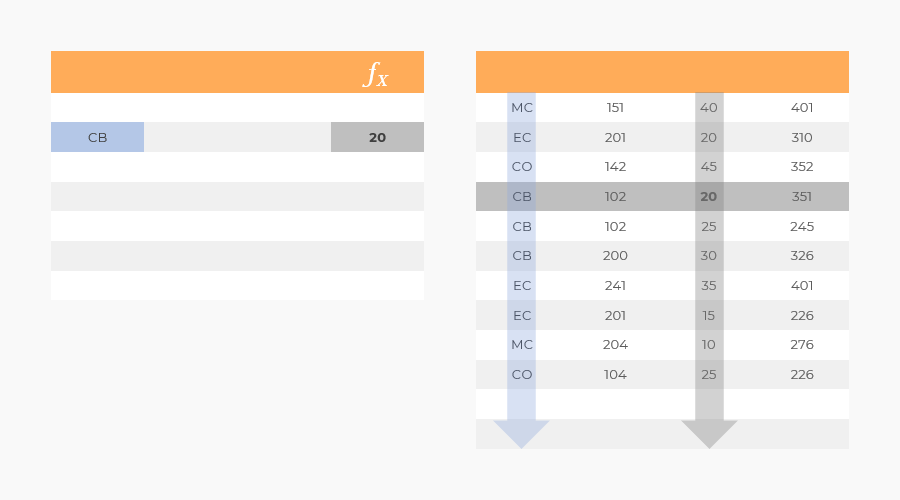
Return value
Returns the value from the defined column and from the same row as the first match between lookup value and the leftmost column.
Syntax
= VLOOKUP(lookup_value; table_array; col_index_num; [range_lookup])
Arguments
| Argument | Description | Options | Description |
|---|---|---|---|
| lookup_value | The value to match in the first column of the table array. | ||
| table_array | The table array to check for matches and return value from. | ||
| col_index_num | The column to return value from when the lookup value matches. Use a Nested MATCH Function in this argument. | ||
| [range_lookup] | [Optional]: Set it to zero (0) as standard. | 1 | Approximate match |
| 0 | Exact match |
Remarks
VLOOKUP can merge large data extracts which is very valuable for analysis.
Warning: VLOOKUP only returns the first match
VLOOKUP only returns the value from the row where the lookup value first matches in the lookup column. This means you risk loosing data if you want to lookup on a lower level than the the lookup column data allows.
Tip: Use keys for lower level VLOOKUP
VLOOKUP on a lower level of detail than the data allows can be achieved by using CONCAT to join data creating unique keys for the lower level.
Quick guides
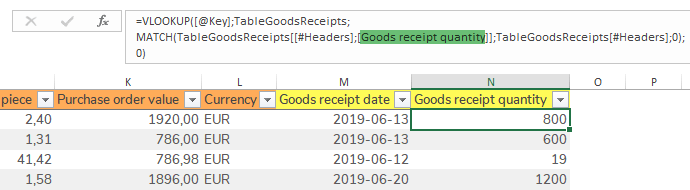
VLOOKUP Formulas can be reused simply by changing the column name within the Nested MATCH Function.
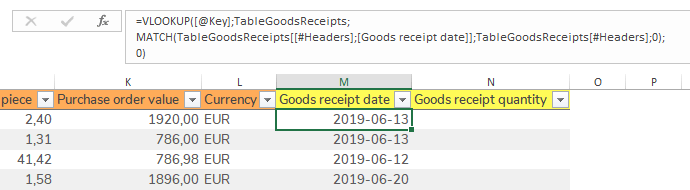
Step 1 − Copy the VLOOKUP Formula from one column to the other.
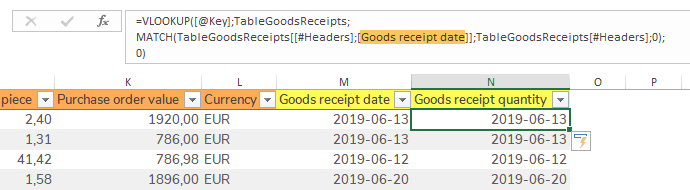
Step 2 − Change the column name in the Nested MATCH Function, Excel gives suggestions.
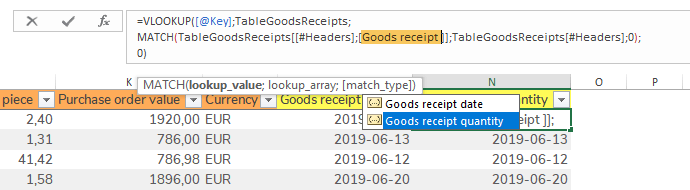
Result − VLOOKUP for Goods receipt date has been reused to lookup Goods receipt quantity.
Video guides
The video shows how to use VLOOKUP together with MATCH to lookup Category and Sub category from TableMaterials to TablePurchaseOrders.